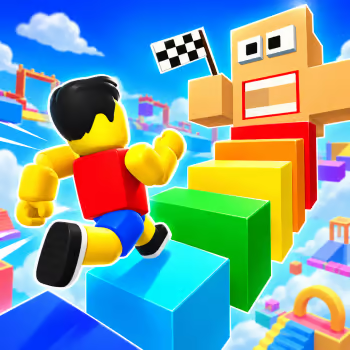
About Obby Tower Parkour Climb
Obby Tower Parkour Climb is a colorful 3D platform game where the only way to reach your goal is to keep moving upward. Starting near the bottom of a towering obstacle course, you must jump between suspended platforms, cross narrow paths, and find a safe route to the finish.
Every successful jump brings you closer to the top, but a small mistake can send your character falling. Some platforms are easy to reach, while others require a running start, precise positioning, or a careful look at the surrounding environment. Learning to judge distances is just as important as moving quickly.
The game offers three distinct parkour maps: Tunnel, Tower, and Stairs. Each introduces a different climbing experience, allowing beginners to practice basic movement before attempting more demanding routes. Checkpoints help reduce the frustration of difficult sections by giving you a place to resume after a fall.
You can explore the courses in Normal Mode without worrying about a countdown or switch to Challenge Mode to test how quickly you can complete a climb. There is also a local two-player option, allowing you and a friend to compete on the same device using separate controls.
Coins earned during gameplay can be used to customize your character with different clothing, hairstyles, and accessories. These cosmetic rewards give you another reason to return after reaching the top.
Play Obby Tower Parkour Climb at GD Lite, master each platform, and prove that you can conquer the tower one jump at a time.
How to Play
Choose between single-player and two-player mode, then select one of the available parkour maps. Beginners can start with an easier course to become familiar with movement and jumping.
Use the movement keys to navigate the platforms and press Spacebar to jump. Hold the sprint key when you need additional running speed, but be careful near narrow edges.
Rotate the camera to inspect the route ahead. Before attempting a difficult jump, check the distance, height, and position of the next platform.
Move through checkpoints as you climb. If you fall, an activated checkpoint can allow you to continue without restarting the entire course.
In Challenge Mode, try to complete the route as quickly as possible. In two-player mode, compete with a friend to see who can reach the finish first.
Controls
Single-Player Mode
-
WASD / Arrow Keys: Move your character
-
Spacebar: Jump
-
Left Shift: Sprint
-
Mouse Movement: Rotate the camera
-
Mouse Scroll Wheel: Zoom in or out
Two-Player Mode
Player 1
-
WASD: Move
-
Spacebar: Jump
-
Left Shift: Sprint
Player 2
-
Arrow Keys: Move
-
L: Jump
-
K: Sprint
Difficulty
⭐⭐⭐⭐☆
Hard
Best For
Platform Games Fans, Obby Players, Parkour Challenges, Two-Player Games, Precision Jumping Fans
Why You'll Love It
-
Climb colorful 3D towers filled with platforming challenges.
-
Explore three different parkour maps.
-
Improve your jumping accuracy on narrow platforms.
-
Use checkpoints to recover from difficult mistakes.
-
Practice freely in Normal Mode.
-
Challenge your completion time in Challenge Mode.
-
Compete with a friend using local two-player controls.
-
Earn coins and customize your character's appearance.
Game Features
-
3D parkour platform gameplay
-
Roblox-inspired character design
-
Vertical tower climbing
-
Three parkour maps
-
Tunnel, Tower, and Stairs courses
-
Different difficulty levels
-
Normal Mode
-
Timed Challenge Mode
-
Single-player gameplay
-
Local two-player competition
-
Split-screen racing
-
Precision jumping
-
Sprinting mechanics
-
Narrow platforms and gaps
-
Checkpoint system
-
Mouse-controlled camera
-
Camera zoom controls
-
Coin rewards
-
Character customization
-
Unlockable cosmetic items
-
Colorful 3D environments
-
Keyboard and mouse controls
-
Browser-based gameplay
Tips and Tricks
Check the Next Platform Before Jumping
Do not rush toward every gap. Look at the distance and height of the next platform so you can choose the right starting position.
Use Sprinting Only When Necessary
Sprinting can help with longer jumps, but extra speed makes narrow platforms harder to control. Slow down when accuracy matters more than distance.
Adjust Your Camera Angle
A different viewing angle can make a difficult jump much easier to understand. Rotate the camera before moving onto unfamiliar sections.
Activate Checkpoints Along the Way
Checkpoints are valuable when climbing long courses. Make sure you pass through them so a failed jump does not erase too much progress.
Practice Before Attempting Speed Runs
Normal Mode is useful for learning a map's layout. Once you know the difficult sections, switch to Challenge Mode and work on improving your completion time.
Stay Focused in Two-Player Races
Watching your opponent too often can cause unnecessary mistakes. Concentrate on your own route and take advantage when your friend misses a jump.
Similar Games
-
Obby Survive Parkour
-
Obby Blox Parkour
-
Stickman Parkour
-
Stickman Parkour Skyland
-
Only Up!
-
Jumping Shell
FAQ
What is Obby Tower Parkour Climb?
Obby Tower Parkour Climb is a 3D platform game where players climb obstacle-filled towers by running, jumping, and navigating suspended platforms.
What is the goal of Obby Tower Parkour Climb?
Your goal is to reach the top of the selected parkour course without falling. In Challenge Mode, you also try to finish as quickly as possible.
How do you play Obby Tower Parkour Climb?
Use WASD or the Arrow Keys to move, Spacebar to jump, and Left Shift to sprint. Rotate the camera with your mouse to inspect upcoming platforms.
How many maps are in Obby Tower Parkour Climb?
The game features three parkour maps named Tunnel, Tower, and Stairs, offering different climbing challenges.
What is Normal Mode?
Normal Mode allows you to explore the course without a countdown, making it suitable for learning the layout and practicing difficult jumps.
What is Challenge Mode?
Challenge Mode adds a timer, encouraging you to complete the parkour course as quickly as possible and improve your previous performance.
Can you play Obby Tower Parkour Climb with a friend?
Yes. The game supports local two-player competition, allowing two people to play together on the same device using separate keyboard controls.
What are the controls for Player 2?
Player 2 uses the Arrow Keys to move, L to jump, and K to sprint.
Does Obby Tower Parkour Climb have checkpoints?
Yes. Checkpoints appear along the courses and allow you to resume from an activated point after falling.
Can you customize your character?
Yes. You can use earned coins to unlock cosmetic options such as clothing, hairstyles, and accessories.
Is Obby Tower Parkour Climb a Roblox game?
It features a Roblox-inspired visual style and obby gameplay, but the browser version can be played independently without launching Roblox.
Is Obby Tower Parkour Climb difficult?
The early challenges are manageable, but higher-difficulty courses require precise jumps, good camera control, and careful movement.
Can I play Obby Tower Parkour Climb on mobile?
The browser version is primarily designed for keyboard and mouse controls. A desktop or laptop is recommended.
Is Obby Tower Parkour Climb free to play?
Yes. Obby Tower Parkour Climb is available to play online for free through compatible browser-game websites.
Who developed Obby Tower Parkour Climb?
Obby Tower Parkour Climb was developed by CursoraLabs.